
How to Reconcile Partial Refunds With Payment Records
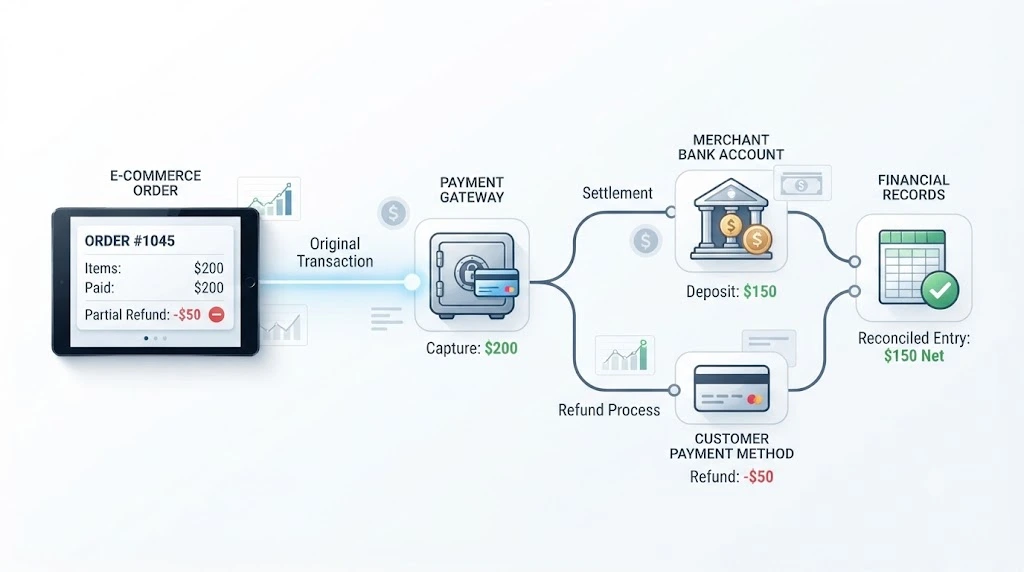
A customer pays $200. You refund $50 because one item arrived damaged. Simple, right?
Then month-end arrives. The order says $200. The gateway shows a $50 refund. The bank shows one payout that matches neither number. Suddenly a small refund is eating an hour of your day.
A partial refund returns only part of the original payment. It should be traceable back to the original payment and the order it belongs to.
Here is how to reconcile partial refunds with payment records: find the original payment, trace each refund through the identifiers your systems share, confirm it in the gateway and settlement data, then compare the result with your bank activity. Anything that doesn’t tie out goes into an exception log.
The steps below follow one refund from order to bank. They stay at the refund level, so you won’t find a full payout walkthrough here.
Why Partial Refunds Can Be Hard to Match With Payment Records
Partial refunds look small. They behave like puzzles.
A Partial Refund Is Linked to the Original Payment
A partial refund doesn’t create a new sale. It reduces what you keep from an existing one, so it has to point back to the original payment.
For example, Stripe’s documentation explains that you can issue more than one refund against a charge, as long as the total doesn’t exceed the original amount. Other gateways may work differently, so check how yours links refunds to payments.
One Order Can Have Multiple Partial Refunds
Order #1042 might get a $50 refund on Monday and a $25 refund two weeks later. Same order, same payment, two refund records.
If your sheet has a single “refund” column per order, the second refund can overwrite the first or go missing.
Refunds and Settlements May Appear at Different Times
Depending on the payment processor and payout schedule, a refund may affect a later payout rather than the same payout as the sale. So a refund that looks “missing” today may simply be on its way.
Payment IDs, Refund IDs, and Order IDs May Be Different
These identifiers may be different across your store, your gateway, and your accounting records. One system calls it an order number. Another calls it a transaction reference. Each refund may also get its own ID.
That is why amount alone is a weak matching key, especially when several transactions have similar values. Two $25 refunds on the same day look identical on paper.
Which Records Do You Need to Reconcile a Partial Refund?
You will usually work with six records. Each one answers a different question.
Ecommerce Order Record
What the customer bought and what your store thinks was refunded.
Pull: Order ID, order total, refunded amount.
Original Payment Record
What the customer actually paid.
Pull: Payment ID, transaction amount, payment date.
Refund Record
What was returned and whether it went through.
Pull: Refund ID, refund amount, refund date, and status.
Payment Gateway Record
Whether the gateway processed both the payment and the refund.
Pull: Gateway transaction or reference, refund details.
Settlement or Payout Record
How the refund affected what the processor paid out.
Pull: Settlement ID, refund or adjustment line, net amount.
Bank Record
What actually moved through the bank account?
Pull: Deposit or withdrawal amount and date.
Here is the quick reference:
| Record | Key field to match |
|---|---|
| Order | Order ID |
| Payment | Payment ID |
| Refund | Refund ID |
| Gateway | Transaction / reference ID |
| Settlement | Settlement / payout ID |
| Bank | Deposit / withdrawal |
Field names vary by system. As one example, the refund object in the Stripe API shows how a refund can reference its original charge, which can help you decide which fields to export.
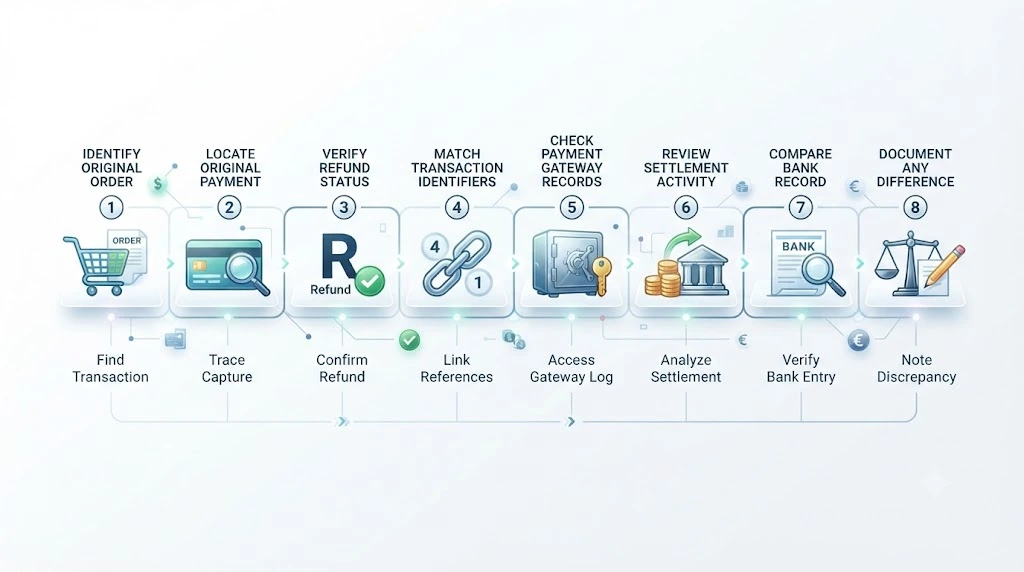
How to Reconcile Partial Refunds With Payment Records
Eight steps. Work through them in order, and most mismatches explain themselves.
Step 1: Find the Original Order
Start with the order ID and the original order amount. This is your anchor.
Step 2: Find the Original Payment
Match the order to its payment or transaction record. Confirm that the payment record accounts for the amount actually collected for the order. Document any difference caused by discounts, gift cards, store credit, split payments, taxes, or shipping.
Step 3: Confirm the Partial Refund
Check the refund amount and its status. If the refund is still pending, it may not yet appear as a completed movement in the expected record. Check your processor’s refund status definitions before treating it as missing.
Step 4: Match the Refund to the Original Payment
Don’t rely on amount alone. Instead:
- Start with the strongest shared identifier available in both records.
- Trace it to the original payment.
- Link it back to the ecommerce order.
- Use amount and date as supporting checks.
For example, if your gateway exposes a refund ID linked to the original payment, use that relationship first.
Step 5: Trace the Refund Into the Gateway Record
Open the gateway and look for the refund reference. Check that it points to the same original transaction you found in Step 2.
Step 6: Check the Settlement or Payout Record
Depending on the processor and payout structure, the refund may affect the same payout, a later payout, or the processor balance. Find where yours landed and note the date.
Step 7: Match the Final Amount With the Bank Record
Work out the expected amount, then compare it with the bank. The bank may show a consolidated payout rather than an order-level transaction, so compare the payout amount and settlement reference where available.
Step 8: Record and Explain Any Difference
If something still doesn’t tie out, log it. Write down the order ID, refund ID, expected amount, actual amount, and a short reason.
If you keep books in Xero, a clearing account can be used to hold processor activity before the corresponding bank payout is reconciled. Xero’s guide to reconciling bulk payments from online sales explains the setup.
Partial Refund Reconciliation Example
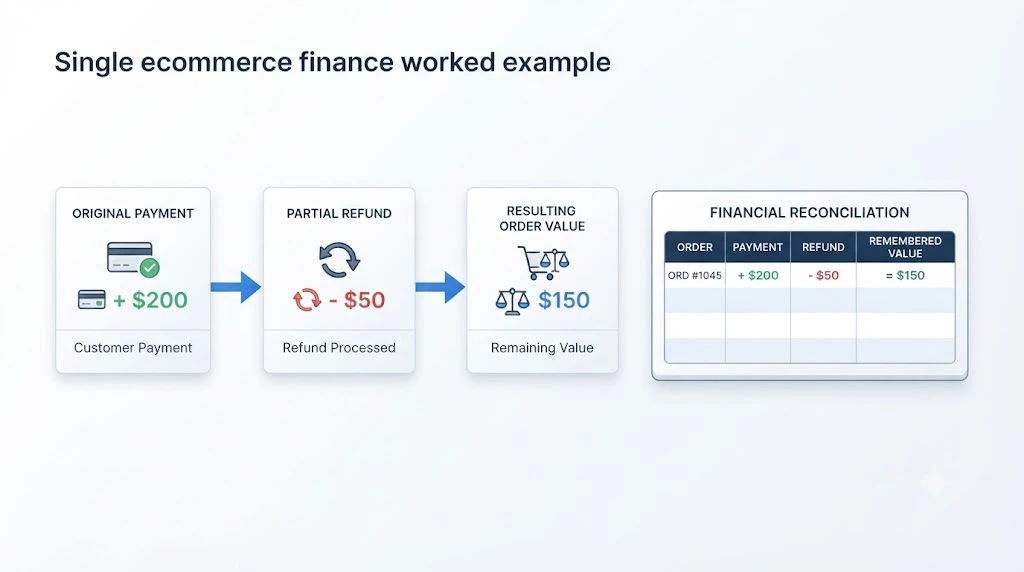
Let’s make this concrete. The numbers and IDs below are a worked example, not data from a real store.
The setup
- Original order: $200
- Original payment: $200
- Partial refund: $50
- Remaining sale value: $150
Example With One Partial Refund
| Stage | Record | What you should see |
|---|---|---|
| Order | ORD-1042 | Total $200, refunded $50 |
| Payment | PAY-7781 | Paid $200 |
| Refund | REF-3301 | $50, linked to PAY-7781, status succeeded |
| Gateway | TXN-9920 | Payment of $200, refund of $50 under the same transaction |
| Settlement | SET-0415 | Depending on the processor’s settlement format, a separate refund or adjustment line, or a netted settlement amount |
| Bank | Payout deposit | The payout reflects the processor’s net settlement after applicable refunds, fees, and other adjustments. |
The order has $150 of value remaining after the $50 refund. The original $200 payment record stays exactly as it was.
Example With Two Partial Refunds
Same order, but the customer returns another item later.
| Event | Amount | Refund ID | Cumulative refund | Still refundable |
|---|---|---|---|---|
| Original payment | $200 | n/a | $0 | $200 |
| First refund | $50 | REF-3301 | $50 | $150 |
| Second refund | $25 | REF-3377 | $75 | $125 |
The order now has $125 of value remaining. Each refund has its own record and may appear as a separate settlement or adjustment entry, depending on the processor.
What to Do When a Partial Refund Does Not Match
Don’t guess. Walk the mismatch through this order:
Mismatch → Check status → Check IDs → Check settlement → Check fees → Escalate
1. Check the Status
Is the refund successful, pending, or failed? A pending refund is not a mismatch yet. Flag it, set a review date, and move on.
2. Check the IDs
Confirm the refund points to the right payment and the payment to the right order. If the payment ID and order ID don’t line up, look in your order metadata for a stored payment reference.
Also add up every refund tied to that payment. Many payment processors prevent the total refund amount from exceeding the original payment, so check your processor’s rules. If your records show more, look for a duplicate entry on your side.
3. Check the Settlement
Search the current and the next settlement for the refund reference. A refund that shows up in a later settlement is a timing difference. Record both dates so the gap is visible.
4. Check Fees and Adjustments
Fees, adjustments, and other refunds can move a payout for reasons unrelated to your refund. Fee treatment on refunds also differs by provider, so check your gateway’s policy.
5. Escalate With the Right Details
If it’s still unexplained, contact your gateway with the order ID, refund ID, amounts, and dates. That gives support everything they need in one message.
How to Reconcile Multiple Partial Refunds for One Order
Multiple refunds are where many spreadsheets break. Three habits keep them clean.
Keep the Original Payment Intact
Never edit the payment to reflect a refund. Keep the original payment record intact and record the refund as a separate transaction or refund event.
Record Each Refund Separately
One refund, one row, one refund reference. Don’t merge two refunds into a single “$75” line, even if they happened on the same day.
Track the Cumulative Refunded Amount
Keep a running total per payment. It shows at a glance how much is left to refund and flags anything that goes over.
Partial Refund Reconciliation vs. Payment Gateway Payout Reconciliation
They sound alike but answer different questions.
| Partial Refund Reconciliation | Payment Gateway Payout Reconciliation |
|---|---|
| Refund-level matching | Full payout-level matching |
| One payment → one or more refunds | Multiple orders → one payout |
| Typically starts with refund/transaction references | Typically starts with payout/settlement references |
| Finds refund discrepancies | Finds overall settlement discrepancies |
| Focuses on refund timing | Focuses on complete payout timing |
If you need to reconcile an entire gateway payout with multiple e-commerce orders, see our guide to payment gateway payout reconciliation.
Common Partial Refund Reconciliation Mistakes
- Matching by amount alone. Similar amounts look identical. Use shared identifiers first.
- Overwriting the original payment. Editing it to “net” the refund destroys your audit trail.
- Treating a refund as a new sale. A refund reverses or reduces the value of the original sale in the relevant records. Don’t record it as a new sale.
- Looking for only one refund per order. The second one goes missing.
- Expecting the same payout every time. Timing can differ, so check later settlements first.
- Blaming the refund for every gap. Fees and other adjustments can also change a payout.
How to Prevent Partial Refund Reconciliation Errors
Prevention is cheaper than investigation.
Use Consistent Transaction References
Where your payment gateway supports metadata or reference fields, store the ecommerce order ID with the payment transaction.
Keep Order, Payment, and Refund IDs Together
Store all three in the same record. If you have to hunt for a link, you’ll eventually skip it.
Maintain a Refund Reconciliation Log
A simple log works: order ID, payment ID, refund ID, amount, date, status, notes.
Reconcile Refunds on a Regular Schedule
Choose a schedule that matches your transaction volume and reporting needs. Higher-volume stores may benefit from more frequent checks.
Create an Exception Process for Unmatched Refunds
Decide who investigates, how long they have, and where the outcome is recorded.
Manual vs. Automated Partial Refund Reconciliation
When a Spreadsheet Is Enough
A spreadsheet can work if you process a modest number of refunds, use one gateway, and keep the log current. It’s cheap and flexible.
When Automation Becomes Useful
Consider automation when refunds pile up or month-end reconciliation keeps running long. Even low-volume sellers may need it if they have multiple currencies, gateways, marketplaces, or settlement accounts.
What an Automated Workflow Should Match
Whatever tool you use, it should follow the same chain you’ve followed manually:
Order ID → Payment ID → Refund ID → Gateway → Settlement → Bank
If a tool can’t show each link in that chain, it may not give you enough visibility to audit the refund from order through settlement.
Frequently Asked Questions
How do you reconcile a partial refund?
Find the original order and payment, confirm the refund amount and status, then match the refund using the strongest shared identifier. Trace it through the gateway and settlement records, compare the result with your bank activity, and log anything that doesn’t match.
Why doesn’t my partial refund match the payment record?
Common causes are timing, multiple refunds, a missing ID link, or a fee adjustment. Check the refund status first, then look at the next settlement.
Can one payment have multiple partial refunds?
Often, yes. Stripe, for example, documents that you can issue more than one refund against a charge, up to the original amount. Other gateways may have their own rules, so check yours.
Can a partial refund appear in a different settlement?
It can, depending on the processor and payout structure. The refund may be created on one day and reflected in a later payout, so record both dates.
What information is needed to reconcile a refund?
Commonly useful fields include the order ID, payment ID, refund ID, refund amount, refund date and status, settlement reference, and the matching bank entry. Not every system exposes all of them.
How do you track a partial refund to the original payment?
Use the refund reference and the payment or transaction reference it points to. Amount and date work best as supporting checks.
Conclusion
Knowing how to reconcile partial refunds with payment records comes down to a few habits:
- Identify the original payment first.
- Trace every partial refund separately.
- Use shared identifiers before amounts.
- Verify in the gateway and settlement records.
- Compare the result with your bank activity.
- Document any difference as an exception.
Your next step: pick five refunded orders from last month and run them through the eight steps above. Note where the chain breaks. That’s the gap to fix first.