
How to Automate Ecommerce Product Tagging Using AI

Open your store admin and look at the tags on your last ten products. Are they consistent? In many stores they aren’t: “leather wallet” on one product, “leather wallets” on another, and nothing on a third. Different people add products at different times, and the tags drift.
AI product tagging is one way to fix that. Instead of typing every tag by hand, you let a tool read your product titles, descriptions,descriptions, and, in some cases, images. It suggests tags, and you approve them. This guide covers automated product tagging with AI and with simple rules, so you can pick what fits your store.
It works well when the setup is clean and badly when it isn’t. Below you’ll find the full workflow, Shopify and WooCommerce setups, tools worth checking, a reusable prompt,prompt, and a realistic look at costs. If you’re also curious about how AI is changing the buying side of e-commerce, see our piece on AI shopping agents in e-commerce.
What Is AI Product Tagging in Ecommerce?
E-commerceE-commerce product tagging means adding short keywords to products, such as material, style, use,use, or occasion. AI product tagging uses an AI tool to read your product data and suggest those tags.
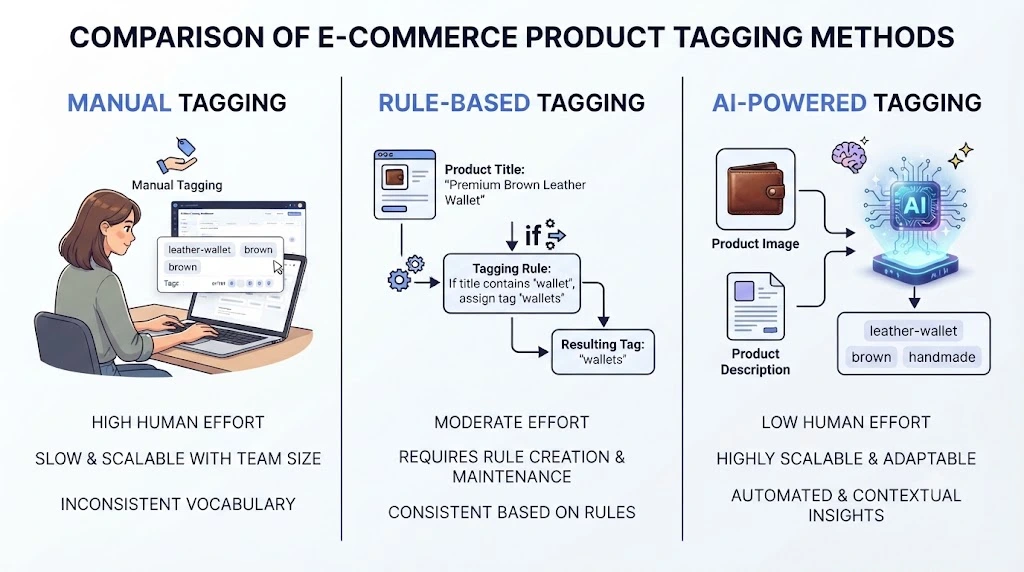
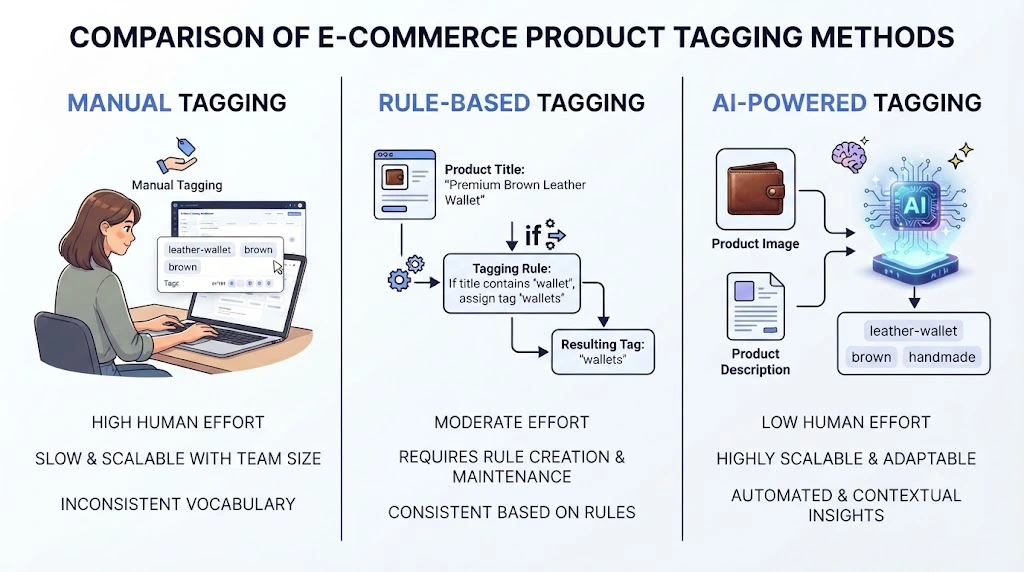
There are three common ways to tag a catalogue:
- Manual tagging: a person types every tag.
- Rule-based tagging: you write rules like “if the title contains ‘wallet,”wallet,’ add the tag wallets.”
- AI-powered tagging: the tool reads the product content and suggests tags without a fixed rule for each one.
Rules are predictable but rigid. AI is flexible but needs checking. Many stores use both.
Three Levels of AI Tagging
Tools use the word “automatic” in different ways. In practice there are three levels:
- Suggest: the AI proposes tags, and you copy the ones you like.
- Suggest and review: the tool prepares tags and holds them until you approve.
- Auto-apply: the tool writes tags to your store with no review.
This guide recommends the second level for most stores. A person should see the tags before customers do.
How AI Generates Product Tags
- The tool reads the product title and description.
- Some tools also look at product images to spot things like color or pattern. Not every tool does this, so check first.
- It suggests tags that match your instructions.
- You approve, edit, or reject them, and the tags get applied.
Step four matters. More on that below.
Product Tags vs. Product Categories vs. Product Attributes
These three get mixed up all the time. The difference also matters for AI product categorization, where a tool sorts products into groups.
| Term | What it does | Example (handmade leather bag) |
|---|---|---|
| Category | Places the product in one main group | Bags |
| Attribute | A fixed, structured detail | Material: full-grain leather |
| Tag | A flexible keyword for search and filtering | handmade, crossbody, gift idea |
Categories are broad. Attributes are factual. Tags are the flexible layer on top.
Why Automate Ecommerce Product Tagging?
A handful of products is easy to tag by hand. A catalogue with thousands is a different job. Here is what automation can help with:
- Time. Large catalogues stop being a manual chore. How much time you save depends on tag count and product complexity, so test on a small batch first.
- Consistency. The same kind of product gets the same kind of tags.
- Filters and store search. Clean tags make collections and filters easier to build and maintain.
- New products. You can repeat the same process every time you add stock.
One caveat. Tags mainly help shoppers find products through your store search and collections. Any effect on Google rankings is not guaranteed. Judge tagging by how much easier it makes browsing and store management.
How to Automate Ecommerce Product Tagging Using AI
Here is the full workflow in seven steps. It works whether you use an app, an automation tool, or a custom script.
Step 1: Audit Your Existing Product Catalogue
Export your products and look at the tags you already have. You’re hunting for duplicates (“Wallet” and “wallets”), wrong tags, and tags nobody understands anymore.
Then decide what happens to old tags: keep, merge, merge, or delete. Before you delete any tag, check whether a collection or a filter depends on it. In Shopify, collections can be built from tag conditions, so removing a tag can empty a collection. Do this cleanup before adding AI, or the AI will copy your mess at scale.
Step 2: Create a Standardized Product Tagging System
Write your rules down. Keep it to one page.
- Pick a format. One common choice is lowercase with hyphens, but any consistent format works.
- Group tags by type: material, style, occasion, and audience.
- Decide the maximum number of tags per product.
- Ban vague tags like “nice” or “popular.” “popular.”
This page becomes the instructions you give the AI.
Step 3: Choose an AI Product Tagging Tool
Your main options:
- Apps that connect to your store and work through a dashboard.
- Rule-based automation such as Shopify Flow, where you set the rules and the tool applies them.
- A custom setup that connects an AI service to your store through code.
Apps are the fastest to start. A custom setup gives you more control but needs someone technical.
Step 4: Feed Product Data to the AI Tool
The AI can only work with what you give it. Titles, descriptions, attributes, and, for some tools, images all help. Not every tool reads images, so check what yours analyses.
A product called “Bag – Brown” with an empty description will get weak tags. Fix the source data first. Bad input gives confident-sounding bad output.
Step 5: Generate and Review AI Product Tags
Run the tool on a small batch. Then read every suggestion against this checklist:
- Is the tag wrong for this product?
- Is it a duplicate or near-duplicate of another tag?
- Does it state a feature the product data never mentions?
- Does it belong in the wrong place, such as a category or attribute rather than a tag?
AI tools sometimes add details that sound right but aren’t in your product data, like a “waterproof” tag on a bag that never mentions water.
Step 6: Apply Tags to Products in Bulk
Before a bulk run, export your products as a backup. Both Shopify and WooCommerce can export products to a CSV file. If something goes wrong, you can restore the old tags.
Then handle new and old products separately:
- Existing catalogue: one-time bulk run, reviewed in batches.
- New products: an ongoing rule or automation that tags each new item with a review step.
Step 7: Monitor and Improve Tagging Accuracy
Check a random sample regularly. A monthly check works for many stores. Fix what’s wrong and update your rules when your catalogue changes. Plan to revisit your tags as your catalogue changes.
Shopify Product Tagging Automation
Shopify gives you two practical routes. First, the limits. According to the Shopify Help Center, a tag can be up to 255 characters, and each product can have up to 250 tags. Shopify Plus stores can have unlimited tags per product.
Method 1: Use a Shopify AI Tagging App
This is the quickest way to start.
- Pick an app from the Shopify App Store.
- Connect it to your store.
- Set your tagging rules and turn on manual review.
- Run a bulk job on a small group of products first.
Apps like TagPilot AI and Easy Tagging take different approaches. We compare them in the tools section.
Method 2: Use Shopify Flow
Shopify Flow works like this: when something happens (a trigger), check a rule (a condition), then do a task (an action). For example, when a product is added, and the product type is “wallet,” add a tag.
Flow can add tags by rules, such as title, SKU, color, or price. Shopify also offers a Flow template that uses OpenAI to suggest tags from the product description. It needs an OpenAI connector and your own API key. The Add product tags action treats tags as case sensitive, so “Wallet” and “wallet” are different tags. That is one more reason to fix your format in Step 2. Shopify also warns that an app or admin user can overwrite tags Flow just added, so test before you rely on it.
To connect Flow to other AI services, you can use the Send HTTP request action. It is available only on the Grow, Advanced, Advanced, and Plus plans. Flow waits up to 30 seconds for a reply, then closes the connection and retries later, so a slow AI service can cause problems.
Shopify Product Tagging Example
This is an illustrative example, not a real store.
Product: Handmade leather wallet.
Hand-stitched bifold wallet made from full-grain brown leather. Six card slots, one bill compartment. Ships in a kraft gift box.
A tool might suggest: handmade, leather-wallet, bifold-wallet, full-grain-leather, brown, mens-accessories, gift, rfid-blocking.
On review, you’d remove it rfid-blocking because the description never says it. You’d keep it gift only if you actually promote gift buying. Final tags: ,,,,,.
Selling handmade goods? Your platform choice matters too. See our breakdown of the best e-commerce platforms for handmade items.
WooCommerce Product Tagging Automation
WooCommerce stores product tags as a built-in tag system, so plugins and code can both work with them.
Method 1: Use WooCommerce AI Tagging Plugin
Look for a plugin that offers tag suggestions and bulk assignment. Some plugins need your own AI API key, which means a separate account and separate usage charges. Check this before you buy.
Method 2: Connect an AI Service Through the API
This route suits stores with a developer or someone comfortable with scripts.
- Read product data from your store.
- Send it to an AI model with your tagging rules. If you want answers in a fixed format that software can read, see the OpenAI structured outputs guide.
- Review the results.
- Save approved tags through the WooCommerce REST API.
Two details to keep in mind. The tags functions create and manage the tags themselves, while attaching a tag to a product is a separate update through the products endpoint. And both need API authentication with permission to edit products.
Keep a review step between 2 and 4. Saving unchecked AI output straight into a live store is the fastest way to create a cleanup job.
WooCommerce Product Tagging Example
Another illustrative example.
Product: Organic cotton tote bag.
Reusable tote bag in 100% organic cotton. Reinforced handles, inner pocket, machine washable. Available in natural and navy.
Possible AI tags: tote-bag, organic-cotton, reusable, eco-friendly, washable, natural, navy, shopping-bag.
On review: tote-bag and shopping-bag mean nearly the same thing, so keep one. eco-friendly is a claim, so keep it only if you can back it up. Approved: tote-bag, organic-cotton, reusable, washable, natural, navy.
AI Product Tagging Tools for Ecommerce
Every detail in this section comes from the tools’ own official listings, checked on September 29, 2026. Prices change, so confirm on each page before you decide. All prices are in USD.
Shopify Tools
TagPilot AI. Per its listing, it analyzes titles, descriptions, product types, variants and availability to generate tags and product type suggestions. You can review suggestions one by one or in bulk, and it offers manual approvals, usage controls and activity logs. There is a free plan. Paid plans are $19.99, $49.99 and $99 per month, with yearly billing at a discount. The app launched on August 17, 2026 and had no reviews when we checked, so test it carefully before relying on it.
Easy Tagging. This one works differently. It is a rule-based tagger for orders, products and customers, and the AI helps you write the rules in plain English. It does not read your product content to invent tags. It had a 4.1 rating from 61 reviews when we checked, and a 15-day free trial.
| Easy Tagging plan | Price per month | Tags per month |
|---|---|---|
| Basic | $4.99 | 2,000 |
| Standard | $9.99 | 10,000 |
| Advanced | $19.99 | 50,000 |
| Pro | $49.99 | 200,000 |
WooCommerce Tool
Smart Product Tags. Read the description closely. It is mainly a badge and visual-tag plugin. AI features are optional: it can suggest tags using GPT and generate icons, and both need your own OpenAI API key. It costs $29 for a one-year plan on the Woo Marketplace, and the plugin documentation covers setup. It suits stores that want tidier tag presentation more than stores that need full catalog-wide auto-tagging. The OpenAI usage is billed separately from the plugin.
Custom AI Setups
A custom setup gives you the most control. You choose the model, write the prompt, set the tag rules and decide what gets saved. You also need technical help, you pay per use, and you are responsible for testing. It makes sense for larger catalogs or unusual tagging rules.
Quick Comparison
| Tool | Platform | How tags are made | API key needed | Price |
|---|---|---|---|---|
| TagPilot AI | Shopify | AI, from product text and variants | No | Free plan; $19.99 to $99 per month |
| Easy Tagging | Shopify | Rules (AI helps write them) | No | $4.99 to $49.99 per month |
| Smart Product Tags | WooCommerce | Optional AI suggestions, plus badges | Yes, for AI features | $29 per year |
For current prices, check each tool’s official page before buying. If you’re also comparing AI tools for other store jobs, our guides on AI customer support for ecommerce and the best AI tools for ecommerce customer support cover that side.
AI Product Tagging Prompt: Example and Output
A Reusable Prompt
If you use a chat tool or an API, the prompt matters more than the model. Here is a starting point:
You are tagging products for an online store.

Product title: [TITLE]
Product description: [DESCRIPTION]

Rules:
- Suggest up to 8 tags. Use fewer if the product details are thin.
- Use lowercase and hyphens only (example: full-grain-leather).
- Use only details found in the title or description.
- Do not guess features that are not stated.
- Do not repeat tags with the same meaning.
- Return a comma-separated list and nothing else.
The “do not guess” line does most of the work. Without it, models like to fill gaps.
Example: AI Tags for a Handmade Leather Bag
Illustrative example.
Title: Handmade Leather Crossbody Bag Description: Hand-stitched crossbody bag in vegetable-tanned tan leather. Adjustable strap, zip closure, one inner pocket.
AI suggestion: handmade, leather-bag, crossbody-bag, vegetable-tanned-leather, tan, adjustable-strap, zip-closure
Final approved tags: handmade, leather-bag, crossbody-bag, vegetable-tanned-leather, tan
In this example, “adjustable strap” and “zip closure” were kept out of the tags and treated as attributes instead. That is one way to organize product data. Your store may handle it differently.
How to Improve AI Tagging Results
- Write clear product titles and descriptions.
- Give the AI a fixed list of allowed tags when you can.
- Keep tag counts low.
- Have a person read the output before it goes live.
How to Keep Tags Accurate and Consistent
- Prevent duplicates. Compare new suggestions against your existing tag list before applying them. Merge near-duplicates.
- Check factual tags. If a tag states a fact (material, size, certification), confirm it against your supplier data, not just the AI’s guess.
- Use one naming pattern. If wallets use
full-grain-leather, bags shouldn’t usefullgrain-leather. - Require approval. Set the tool to hold tags for review. It is slower, and it is how you avoid a public mistake.
Common AI Product Tagging Mistakes to Avoid
- Too many tags. Ten focused tags beat forty vague ones.
- Near-identical tags. “Tote” and “tote-bag” split your filters for no reason.
- Trusting guesses as facts. The AI can sound sure and be wrong.
- Mixing up tags and categories. They do different jobs.
- Leaving old tags alone. Outdated tags confuse both shoppers and tools.
- Bulk tagging with no review or backup. This is the costliest mistake.
AI Product Tagging vs. Manual Product Tagging
| Factor | Manual Tagging | AI-Assisted Tagging |
|---|---|---|
| Initial setup | Write rules by hand | Write rules and configure the tool |
| Tag generation | Created by people | Suggested by AI |
| Consistency | Depends on your process | Depends on your rules and review |
| Bulk catalog handling | Slow, or tool-assisted | Depends on the tool |
| Accuracy | Depends on the person | Depends on the AI and the review |
| Cost | Staff time | Tool, API and review costs |
AI-assisted tagging tends to make sense once the catalog is too big for one person to keep tidy.
A Vendor-Published Case Study: Two Fashion Stores Moving From Manual Tagging
Here is one published example. It comes from the company that sells the tagging service, so read it with that in mind.
In a 2023 case study, the fashion-tagging company YesPlz AI described how two online clothing stores, Melimile and CuteDresses, moved away from manual product tagging. Per the case study, the tool tagged products using image-reading and text-reading AI, covering things like category, color, pattern, vibe and occasion. It says the integration took a few days.
The two stores connected differently. Melimile, on Shopify, used the company’s app, and the tag data was sent to its store metafields (extra product data fields). CuteDresses wasn’t on Shopify, so it shared a product feed as a CSV file and got the tag data back in the same format. The case study notes that its Shopify app was not publicly listed at the time, so interested readers may need to contact the company.
The case study also gives cost estimates. It says tagging 2,000 products by hand takes about 80 hours, or roughly $1,600 at $20 an hour. It says average AI tagging in the industry costs about $200 to $600. These are the company’s own estimates, not independent results. The case study doesn’t publish accuracy scores or sales outcomes, and we can’t say the tags caused any business result.
What it does show is the shape of a realistic setup: a small team, a defined tag list, a data handoff, and tags landing in the store’s own fields. You can read the full YesPlz case study on automated tagging for fashion ecommerce.
How Much Does AI Product Tagging Cost?
Your total depends on catalog size, the tool you pick and how much review you do.
Subscription Costs
For the tools in this guide, app plans run from free to $99 per month. Smart Product Tags is priced at $29 per year. Other tools on the market may cost more or less, so treat this as a range for these tools only. Some apps have free plans or trials.
API Usage and Integration Costs
A custom setup usually charges per use. Check your AI provider’s current pricing page, since rates change. You may also pay a developer to build and maintain the connection.
Hidden Costs
- Review time. This is usually the biggest cost.
- Cleanup time. Fixing bad bulk tags takes longer than reviewing first.
- Setup time. Writing your tag rules and testing.
How to Estimate Your Own Cost
Worked example using assumed numbers.
Say you have 2,000 products and expect to spend 30 seconds reviewing each set of suggested tags. The 30 seconds is an assumption, not an average.
- Review time: 2,000 × 30 seconds = 60,000 seconds, or about 17 hours.
- Tool cost: your chosen plan for the month or two you need it.
- Setup time: a few hours for rules and testing.
This total adds the tool cost and setup time on top of review time. Multiply the hours by your own hourly rate, and compare the result with how long it would take to type tags for 2,000 products from scratch. Swap in your own numbers.
Frequently Asked Questions About AI Product Tagging
What is AI product tagging?
It is the use of AI to read your product data and suggest tags for search, filters and organization. A person normally approves the tags before they are applied.
Can AI automatically tag ecommerce products?
Some tools can suggest tags, some hold them for your review, and some apply them automatically. Capabilities differ by tool. Most stores keep a review step for quality.
How do I automate product tagging in Shopify?
You can use a Shopify tagging app or build a workflow with Shopify Flow. Flow can add tags from rules, and Shopify offers a template that uses OpenAI to suggest tags. Connecting other AI services through Send HTTP request needs the Grow, Advanced or Plus plan.
Can WooCommerce automatically generate product tags using AI?
Yes, through a plugin with AI features or a custom setup that sends product data to an AI service and saves approved tags through the WooCommerce REST API. Some plugins need your own AI API key.
Which AI tool is best for ecommerce product tagging?
There is no single best tool. Choose by platform, budget and how much automation you want. If you need AI-written tags, look at tools like TagPilot AI. If your rules are clear and you want predictable results, a rule-based tool like Easy Tagging may fit. Test two options on the same 30 products and compare.
Can AI generate product tags from images?
Some tools can, especially fashion-focused ones. Others only read text. Check what each tool actually analyzes before you buy. For example, the TagPilot AI listing describes text and variant data.
How accurate is AI product tagging?
Accuracy varies by tool, product type and the quality of your product data. We couldn’t find an independent accuracy benchmark to quote, so run your own sample check before applying tags widely.
Does AI product tagging improve SEO?
Tags mainly help shoppers find products through store search and collections. Any effect on Google rankings is not guaranteed. Treat tagging as catalog organization, not an SEO shortcut.
Can I automatically tag thousands of products?
Several tools support bulk tagging, but limits differ. Easy Tagging, for example, caps tags per month by plan. Review a sample of each batch, since one wrong rule repeated across thousands of products is expensive to undo.
How much does automated product tagging cost?
For the tools in this guide, app plans range from free to $99 per month, plus your review time. Custom setups vary with usage. Use the worked example above to estimate your own total.
Final Thoughts
AI product tagging works best as a simple loop: clean your catalog, write your tag rules, pick a tool, review the output, back up, apply in bulk, and check again later.
The rules and the review matter more than the tool. Get those right and even a simple setup can save time.
Your next step: pick 30 to 50 products from one category, run them through a tool or the prompt above, and review every tag by hand. Note how many you would keep. That number tells you whether the setup is ready for the rest of your catalog.