
How to Automate Ecommerce Customer Support With AI
Every growing online store hits the same wall eventually. Order tracking questions pile up. Returns and refund requests repeat themselves word for word. Your support team spends hours answering things customers could technically find on their own, if only someone pointed them there faster. That’s the exact gap AI customer support for ecommerce is built to close.
This isn’t a roundup of chatbot tools. It’s a practical, step-by-step walkthrough of how to actually design, connect, test, and scale an AI-powered support system — one that handles the repetitive work while keeping humans in charge of everything that matters.

What Is AI Customer Support for Ecommerce?
AI customer support for ecommerce means using automated systems to understand a customer’s question, pull the right information, and respond — without a human typing every reply. It’s a shift from reactive, ticket-by-ticket handling to a system that resolves the predictable stuff automatically and routes the rest.
Traditional Ecommerce Customer Support
Traditional support relies on agents manually reading and replying to every message. It works, but it’s slow to scale. Repetitive tickets consume the same amount of time as complex ones, response times stretch during peak seasons, and teams often juggle multiple disconnected tools just to answer one question.
AI-Powered Ecommerce Customer Support
AI-powered support flips that model. The system reads the customer’s intent, retrieves relevant order or product data, generates a response, and — where allowed — takes an action like updating a tracking link. Anything outside its comfort zone gets escalated to a person immediately.
What Ecommerce Customer Support Tasks Can AI Automate?
Not every support task is a good fit for automation, but a large chunk of daily tickets are. Here’s where AI typically earns its keep first.
Order Tracking and WISMO Requests
“Where is my order?” is usually the single largest category of ecommerce tickets. AI can pull real-time shipping data and answer instantly, without a human ever touching the ticket.
Product Questions
Size charts, availability, specifications, and compatibility questions are repetitive by nature. AI can answer these consistently using your product catalog as the source of truth.
Shipping Questions
Delivery windows, shipping options, and international delivery rules are static enough to automate confidently, as long as the information stays current.
Returns and Refunds
AI can check return eligibility, walk a customer through the process, and share refund status updates — often with a human safety net for edge cases.
FAQs and Policy Questions
Payment methods, cancellation windows, warranty terms, and shipping policies are ideal automation candidates because the answers rarely change from customer to customer.
Post-Purchase Follow-Ups
Delivery confirmations, review requests, and proactive shipping updates can all run automatically, improving the experience without adding to your team’s workload.
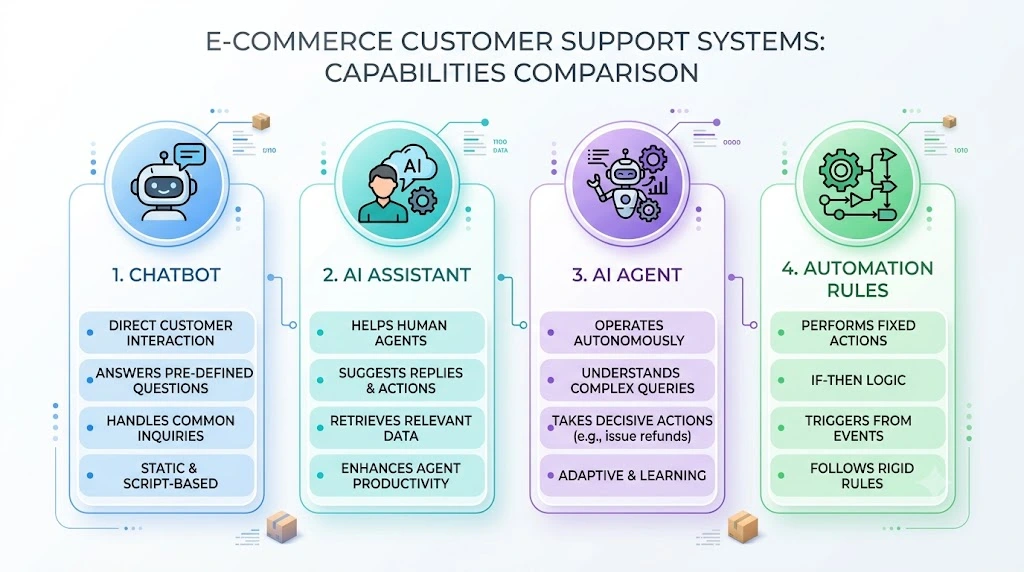
Chatbot vs AI Assistant vs AI Agent vs Automation Rules
These terms get used interchangeably, but they’re not the same thing — and picking the wrong one is a common reason automation projects underdeliver.
| System | Main Job | Example |
|---|---|---|
| Chatbot | Answers questions | “What are your shipping times?” |
| AI Assistant | Helps a human agent | Drafts a reply for approval |
| AI Agent | Understands and acts | Checks an order and responds directly |
| Automation Rules | Fixed, rule-based actions | Automatically routes refund tickets |
Which One Does Your Ecommerce Store Need?
Smaller stores with straightforward tickets often do fine with a chatbot plus automation rules. Larger stores with complex order and return logic usually need a true AI agent that can read data and act, not just respond with scripted answers.
How AI Customer Support Automation Works for Ecommerce
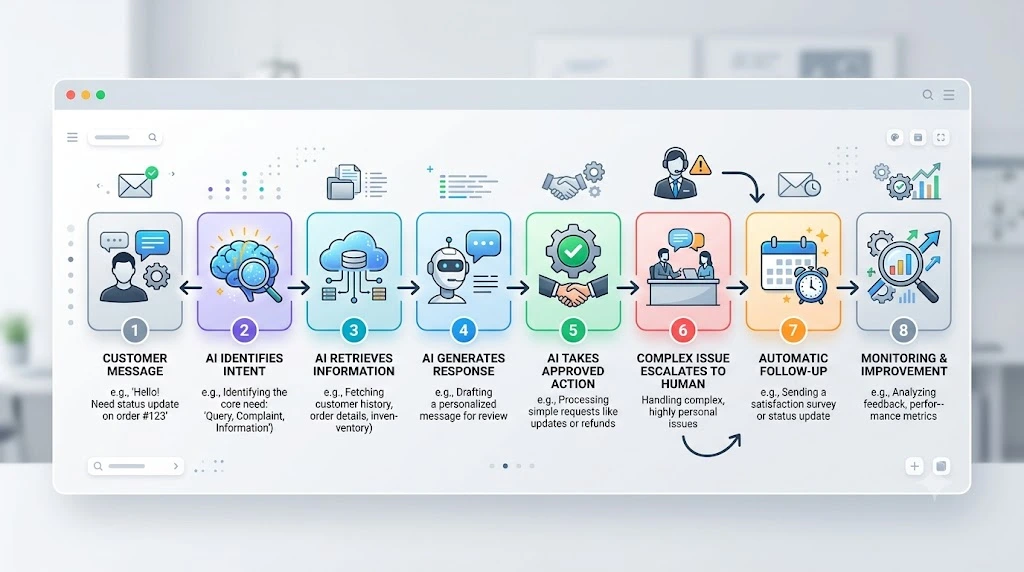
Behind every automated reply is a short but specific chain of events. Understanding this flow makes it much easier to plan your own setup.
Step 1 — Customer Sends a Message
The process starts wherever the customer reaches out — live chat, email, or a support form.
Step 2 — AI Identifies the Intent
The system classifies what the customer actually wants: a tracking update, a return, a product question, and so on.
Step 3 — AI Retrieves the Right Information
Based on the intent, AI pulls data from the knowledge base, order management system, or product catalog.
Step 4 — AI Generates or Sends the Response
The reply is drafted using that retrieved data, not guesswork or generic phrasing.
Step 5 — AI Takes an Approved Action
If configured to do so, the AI can trigger an action — updating a tracking note, initiating an approved refund workflow within predefined policy limits, or applying a discount code.
Step 6 — Complex Issues Go to a Human
Anything ambiguous, emotional, or high-risk gets escalated with full context attached, so the agent isn’t starting from zero.
Step 7 — Follow-Up Happens Automatically
Once resolved, the system can send a confirmation, a satisfaction survey, or a proactive update — closing the loop without manual effort.
How to Automate Ecommerce Customer Support With AI: Step-by-Step
This is where planning turns into action. Follow these steps in order rather than trying to automate everything on day one.
1. Audit Your Existing Support Tickets
Start by identifying your highest-volume questions, the most repetitive requests, average handling time per category, and which issues tend to escalate the most. This audit tells you exactly where automation will have the biggest impact.
2. Choose What to Automate First
Tier 1 — Safe to automate: FAQs, order tracking, shipping questions, product information.
Tier 2 — Automate with safeguards: returns, cancellations, order changes, refund requests.
Tier 3 — Keep human-first: angry customers, complex complaints, payment disputes, fraud-related issues, high-value or problem orders.
3. Build or Clean Your Ecommerce Knowledge Base
Your AI is only as accurate as the information it’s given. Make sure FAQs, policies, product details, shipping rules, and return rules are current and clearly written before automation goes live.
4. Connect Store and Order Data
A static FAQ database can only go so far. AI needs live access to real customer and order data to answer questions like “where is my order” or “can I return this” accurately — otherwise it’s just guessing.
5. Configure AI Response Rules
Clearly define what the AI can answer, what actions it can take, what it absolutely cannot do, and the exact conditions under which it should escalate to a human.
6. Test AI With Real Support Scenarios
Run it through a normal question, a request with incomplete information, an angry customer, a refund request, and an unusual edge case before trusting it with live traffic.
7. Launch With Human Oversight
Start with supervised automation — AI drafts, a human approves — before letting it respond independently. This builds trust in the system gradually.
8. Monitor and Improve
Track resolution rate, escalation rate, response time, customer satisfaction, and incorrect answers on an ongoing basis, then refine the knowledge base and rules accordingly.
Ecommerce AI Customer Support Workflow Examples
Seeing the workflow applied to real scenarios makes the whole system easier to picture.
Example 1 — “Where Is My Order?”
Customer asks → AI looks up the order → checks shipping status → calculates an ETA → sends a clear, specific reply.
Example 2 — “Can I Return This Product?”
Customer asks → AI checks the order → applies the return policy → confirms eligibility → shares return instructions.
Example 3 — Product Recommendation
Customer shares a requirement → AI matches it against product data → suggests relevant options → hands off to a human if the request gets too specific.
Example 4 — Angry Customer
AI detects negative sentiment early → deliberately avoids automating the reply → routes the conversation straight to a human agent with context attached.
How to Connect AI Customer Support to Your Ecommerce Stack
Automation only works well when the pieces are actually talking to each other. A functional stack typically includes your ecommerce platform — Shopify, WooCommerce, BigCommerce, or another — a helpdesk, an order management system, a knowledge base, an AI layer sitting on top, and a human support team ready for escalations. Mapping these connections before launch prevents most of the common automation failures later.
How Much Ecommerce Customer Support Can AI Automate?
There’s no universal number here, and any source claiming otherwise is overselling. Your actual automation rate depends on your ticket mix, the quality of your knowledge base, how well your systems are integrated, product complexity, and how strict your return policies and escalation rules are.
Calculate Your Potential Automation Rate
A simple formula gets you a realistic starting estimate:
Automatable Tickets ÷ Total Support Tickets × 100
For example, if 600 out of 1,000 monthly tickets are repetitive, low-risk questions, your potential automation rate works out to roughly 60% — though your own number will depend on your ticket mix and how well your systems are connected.
How to Measure the ROI of AI Customer Support Automation
Once automation is live, these are the metrics worth tracking closely: support ticket volume, average handling time, cost per ticket, AI resolution rate, human escalation rate, customer satisfaction, and monthly cost savings. Reviewing these monthly helps you see whether automation is actually paying off — and where it still needs work.
Common Mistakes When Automating Ecommerce Customer Support With AI
Most automation projects don’t fail because of the technology — they fail because of how it’s rolled out. Watch for these traps: automating everything at once, giving AI outdated information, not connecting real order data, offering no human handoff path, letting AI make high-risk decisions unsupervised, and measuring success only by response time instead of accuracy or satisfaction.
When Should Ecommerce Customer Support Stay Human?
Automation should never touch everything. Complex complaints, sensitive payment issues, fraud concerns, legal matters, highly emotional customers, unusual orders, and VIP or high-value situations should stay firmly in human hands. This is where trust is built or lost, and no automation shortcut is worth risking it.
How to Start AI Customer Support Automation on a Small Budget
You don’t need an enterprise budget to get started. Begin with FAQs, since they’re the simplest to automate and immediately reduce ticket volume. Next, automate order tracking, since WISMO questions are usually your highest-volume category. Then add return and shipping workflows once the basics are stable. Finally, layer in more advanced AI agent capabilities as your store and support volume grow.

AI Customer Support Automation vs Traditional Support
| Factor | Traditional | AI-Assisted |
|---|---|---|
| Response speed | Manual | Automated |
| Repetitive queries | Human handled | AI handled |
| Order lookup | Manual | Automated |
| 24/7 availability | Limited | Possible |
| Complex issues | Human | Human |
| Scalability | Team-dependent | Higher |
Frequently Asked Questions
How can AI help in ecommerce? AI helps ecommerce businesses by automating repetitive support tasks, speeding up order-related responses, personalizing product recommendations, and freeing up human agents to focus on complex or sensitive cases.
Which AI is best for ecommerce? The best choice depends on your ticket volume and complexity — smaller stores often do well with a chatbot plus automation rules, while larger stores benefit more from a true AI agent connected to live order data.
Which AI agents are best for ecommerce? Look for AI agents that can integrate directly with your ecommerce platform, order management system, and knowledge base, since real data access is what separates a useful agent from a generic chatbot.
Is AI good for customer service? Yes, for the right use cases. AI is highly effective for repetitive, well-defined questions, but it should always work alongside — not replace — human agents for complex or emotionally sensitive situations.
Can AI automate ecommerce customer support? Yes, a significant portion of ecommerce customer support can be automated, particularly order tracking, shipping questions, FAQs, and straightforward returns, when the AI is properly connected to real store data.
How much of customer support can AI automate? It varies by business. Stores with a high volume of repetitive, low-risk questions can automate a substantial share of support, while complex or sensitive cases still require human involvement.
Can AI handle returns and refunds? AI can check return eligibility, explain the process, and share refund status, though refunds involving unusual circumstances or high order values are best routed to a human for final approval.
Final Takeaway
Automating ecommerce customer support isn’t about replacing your team — it’s about giving them room to focus on what actually needs a human touch. Start with repetitive, low-risk support tasks, connect real ecommerce data, add controlled AI actions, keep human escalation in place, measure your results consistently, and expand automation gradually from there.
Compare the Right Tools Before You Build
Choosing the right platform matters just as much as the workflow itself, and not every tool is built for the same job.
If you’re ready to compare specific platforms side by side, our guide to the best AI tools for ecommerce customer support automation breaks down the top options so you can pick the right fit for your store — take a look before you commit to a platform.