AI Abandoned Cart Emails for Shopify: Personalize the Copy

A shopper adds a handmade wallet to their cart, checks the shipping cost, gets distracted and leaves. AI abandoned cart emails can help a small Shopify store make its recovery message more relevant—but only when the copy uses accurate product details and appropriate customer context.
It cannot guarantee a recovered sale, and it should not invent product claims, discounts or customer preferences.
This guide focuses on one practical angle: using AI to personalize the copy inside an abandoned checkout email flow you already have. For the setup basics, see our guide to Shopify abandoned cart email automation. If your store is also reviewing support workflows, our guide to AI tools for ecommerce customer support covers a separate use case.
What AI Abandoned Cart Emails Can—and Cannot—Improve
Your email platform or Shopify flow determines when a message is sent. AI can assist with the wording of AI abandoned cart emails.
| AI can help with | AI should not decide or invent |
|---|---|
| Drafting relevant subject lines and preheaders | Whether a shopper has given marketing consent |
| Referencing accurate product details | Discounts, deadlines or stock scarcity |
| Adapting tone to a broad customer segment | Personal preferences not supported by data |
| Creating copy variations for a test | Whether a campaign has actually increased sales |
Treat AI as a drafting assistant, not an autopilot, when creating AI abandoned cart emails. Review every message before it goes live.
What Data Should You Use?
Start with the minimum information needed to write useful AI abandoned cart emails.
Product and checkout context
- Product name and accurate description
- Cart or checkout items
- Product URL or valid recovery link
- Relevant cart value, if it changes the help offered
Customer context
- First-time or returning customer, when reliably known
- Relevant purchase history, where permitted
- Broad segment information that is useful to the message
- Marketing permission and applicable sending rules
Use only data you are authorized to process. Shopify describes merchant responsibilities in its privacy and data protection guidance. Do not paste unnecessary personal or sensitive customer information into an AI tool.
Check the audience setting in your Shopify automation: Shopify says the new abandoned checkout automation is configured to email customers who are subscribed to email marketing by default; the “To” field can be changed. Confirm this setting against Shopify’s current abandoned checkout automation guidance before publishing or changing your flow.
A simple quality rule: if a detail is not supported by your product page, checkout data or approved customer record, leave it out.
How to Personalize AI Abandoned Cart Emails in Your Existing Shopify Flow
These steps assume your abandoned checkout automation already works and show how to improve AI abandoned cart emails. Keep the trigger and timing stable while you test new copy.
Step 1: Separate the sending tool from the AI writing tool
You may not need to replace your email platform. The sending workflow and the copywriting assistant can be separate.
| Tool or workflow | What official documentation supports | How to use it here |
|---|---|---|
| Shopify Messaging abandoned checkout automation | Shopify documents editing the email, subject line, preview text, audience and workflow settings | Use it to manage and send the recovery email; draft personalized copy separately unless your admin shows a specific AI feature |
| Klaviyo Starter for Shopify | Klaviyo documents abandoned checkout automated messages and branded templates | Use it for the flow if it is already your platform; do not assume a particular AI-writing feature is included in your plan |
| Separate AI writing assistant | Feature availability depends on the assistant and plan | Generate draft copy from a minimal, approved brief; then review and paste it into your email editor |
Shopify’s documentation describes editing abandoned checkout messages and managing the automation, but does not establish that every Shopify Messaging account has built-in generative AI copy. Check the features available in your own account before describing a platform as “AI-powered.” Shopify abandoned checkout automation documentation and Klaviyo Starter automated messages documentation.
If your current tool already sends the emails reliably, avoid switching platforms just to test a few lines of copy.
Step 2: Prepare a small, accurate brief
Give the AI:
- Product name and verified product details
- The intended customer segment
- Your brand voice
- The email’s purpose and one clear call to action
- Any restrictions, such as “no discount” or “no urgency claims”
A clear brief is more useful than a large customer-data dump.
Step 3: Generate a few copy options
Ask for a small set of subject lines, one preheader and a concise email body. Keep the message focused on helping the shopper return or resolve a checkout question.
Step 4: Add the approved copy to your existing flow
Keep your current trigger and timing unchanged for the first test. Use Shopify’s current abandoned checkout automation guidance and your email platform’s documentation to confirm completed-order exclusions, recovery links and sending behavior.
Step 5: Test AI Abandoned Cart Emails Before Sending
- Check every dynamic field and add fallback text if a name is missing
- Confirm the product details are accurate
- Click the recovery link and verify it opens the right checkout
- Preview the email on mobile and desktop
- Confirm purchasers are excluded according to your flow’s rules
- Review consent, unsubscribe and sender details
AI Abandoned Cart Emails: Personalization by Customer Context
Personalizing AI abandoned cart emails does not require a separate email for every person. Start with a few useful, reliable segments.
| Customer context | Helpful message approach | Avoid |
|---|---|---|
| First-time shopper | Clear product information, shipping/returns help and a direct CTA | Assuming they already know your brand |
| Returning customer | A familiar but restrained tone; relevant context if permitted | Mentioning unrelated past purchases |
| Higher-value checkout | Offer help with product, shipping or checkout questions | Automatically giving a discount |
| Product-specific concern | Answer a common question using verified information | Guessing why the shopper left |
These are copy directions to test—not claims that one segment will necessarily convert better.
AI Abandoned Cart Emails: Subject Lines and Copy Examples
Here is one AI abandoned cart email example carried through from the brief to the message. The copy is illustrative and has not been performance-tested.
| Input | Example |
|---|---|
| Product | Handmade leather wallet |
| Segment | First-time shopper |
| Brand tone | Helpful, friendly and non-pushy |
| Goal | Help the shopper return to checkout |
| CTA | Return to Your Cart |
Copy-and-paste AI prompt
Draft a concise abandoned checkout email for a small Shopify store.

Product: Handmade leather wallet
Verified product details: [Paste accurate details from the product page]
Customer segment: First-time shopper
Brand tone: Helpful, friendly and non-pushy
Email goal: Help the shopper return to checkout
CTA: Return to Your Cart

Provide:
- 4 subject line options, each under 50 characters
- 1 short preheader
- 1 concise email body

Do not invent product claims, discounts, deadlines, scarcity or customer preferences.
Do not imply that the shopper chose a product for a particular reason.
Use a placeholder for any missing customer name.
Illustrative subject line options
- Still thinking about your leather wallet?
- Your handmade wallet is in your cart
- Need help with your checkout?
- Take another look at your wallet
These are examples, not verified high-performing subject lines. Choose the one that best matches your brand and test it.
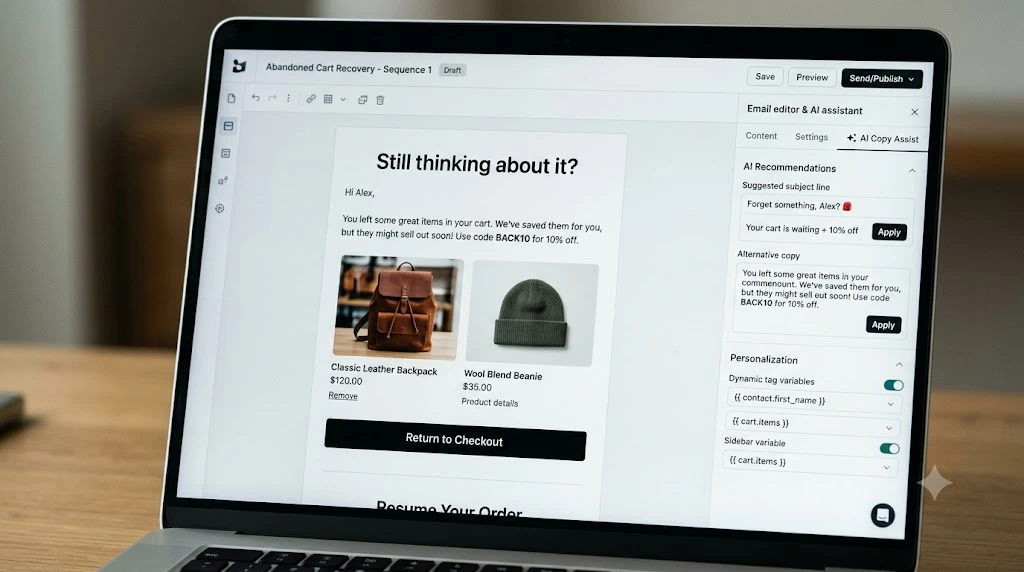
Example email
Subject: Still thinking about your leather wallet?
Preheader: Take another look at the items in your checkout.
Body:
Hi [First name or “there”],
You left a handmade leather wallet in your checkout. If you’re still considering it, you can take another look using the link below.
[Add one accurate product detail from your product page.]
Have a question about shipping, returns or the wallet itself? Reply to this email and we’ll help.
CTA: Return to Your Cart
Human review before publishing
- Product information matches the live product page
- No unsupported discount, deadline or claim was added
- Tone sounds like your brand
- Missing personalization fields have a fallback
- CTA opens the correct checkout
- Message complies with your consent and sending rules
How to Test AI Abandoned Cart Emails for Better Recovery
Do not assume AI abandoned cart emails perform better just because AI helped write them. Compare AI abandoned cart emails with your current message.
For a first test, change only the copy. Keep the audience, trigger, timing, offer and other settings the same. If your platform supports a randomized split, compare the current version with the AI-assisted version.
Track:
- Delivery rate
- Click-through rate
- Checkout recovery rate
- Recovered revenue
- Unsubscribe or complaint rate
Use the same definitions and attribution window for both versions. Email-platform-attributed revenue is not necessarily incremental revenue: some shoppers may have returned without the email.
If volume allows, a holdout group that receives no recovery email can help estimate incremental lift. Small stores may need more time to collect enough observations. Avoid declaring a winner from a handful of orders.
Common AI Abandoned Cart Email Mistakes to Avoid
- Publishing unreviewed AI copy: verify every product fact and link.
- Adding discounts by default: test helpful copy before introducing an incentive.
- Using fake urgency: do not claim a deadline or low stock unless it is accurate.
- Over-personalizing: use only relevant, permitted information.
- Changing several variables at once: isolate copy changes so the result is interpretable.
- Overreading small samples: wait for enough data and report uncertainty.
- Ignoring the customer experience: make the message easy to understand, act on or unsubscribe from.
AI Abandoned Cart Emails: Implementation Checklist
- Confirm the existing abandoned checkout flow works
- Choose a compatible AI drafting method
- Prepare accurate product and segment inputs
- Generate copy using a clear prompt
- Review claims, tone, consent and personalization
- Add fallback text for missing fields
- Test recovery links and purchaser exclusions
- Change only the copy for the first comparison
- Track clicks, recovery and negative signals
- Document the test window and result limitations
AI Abandoned Cart Emails: Frequently Asked Questions
Can AI personalize abandoned cart emails in Shopify?
Yes. AI can assist with copy tailored to accurate product details or broad customer segments. Your Shopify or email platform flow still handles the trigger and sending, depending on your setup.
Do I need a paid AI tool?
Not necessarily. You may be able to draft copy with a tool you already use and add the reviewed version to your current email platform. Paid features may matter if you need integrated dynamic content, workflow controls or reporting.
What data should AI use?
Start with verified product details, checkout context and a relevant segment. Use customer information only when you are authorized to use it, and avoid unnecessary or sensitive data.
What makes a good AI abandoned cart subject line?
Keep it clear, concise and relevant. Avoid fake urgency, misleading personalization and promises that the email cannot support.
How can I tell whether AI improves cart recovery?
Compare AI-assisted copy with your current copy while holding other campaign settings steady. Track recovery and negative signals, and use a holdout group when feasible to estimate incremental impact.
Conclusion: Improve AI Abandoned Cart Emails with Care
AI abandoned cart emails are most useful as a controlled copy improvement—not a replacement for your Shopify recovery flow. Start with one message, provide accurate inputs, review the output and test it against your current email.
Use the handmade-wallet example as a starting point, adapt it to a real product and let your own results—not assumptions—decide whether to expand the test.
Next step: Open your existing abandoned checkout flow and test one reviewed AI-assisted email against the current version.