
Ecommerce AI Chatbot: How to Automate Returns, Refunds and Support
Online shoppers don’t wait anymore. If a customer can’t check a return window, track a refund, or get a straight answer in seconds, they leave — and they often don’t come back. That’s the pressure behind one of the fastest-growing tools in online retail: the ecommerce AI chatbot.
According to the National Retail Federation’s 2025 Retail Returns Landscape report, U.S. retailers project $849.9 billion in returns this year, with an estimated 19.3% of all online sales expected to come back. That’s nearly one in every five orders — and each one comes with a “can I return this,” “where’s my refund,” or “can I exchange it” question attached.
This guide focuses specifically on where that pressure is highest: automating returns, refunds, and exchanges with AI, and knowing exactly when to hand a case to a human instead. For a broader look at automating ecommerce support end-to-end — order tracking, shipping, product questions, and implementation — see our guide on AI customer support for ecommerce.

What Is an Ecommerce AI Chatbot?
An ecommerce AI chatbot connects directly to your store’s live order, product, and policy data instead of relying on a fixed script. It understands what a customer is actually asking, then answers directly or takes action — like starting a return — rather than pointing them to a help article.
That’s the core difference from a traditional chatbot: a static bot matches keywords to pre-written replies, while an AI-powered one reads context, pulls real order data, and completes tasks. This article stays focused specifically on how that plays out for returns and refunds.
How Ecommerce AI Chatbots Handle Returns
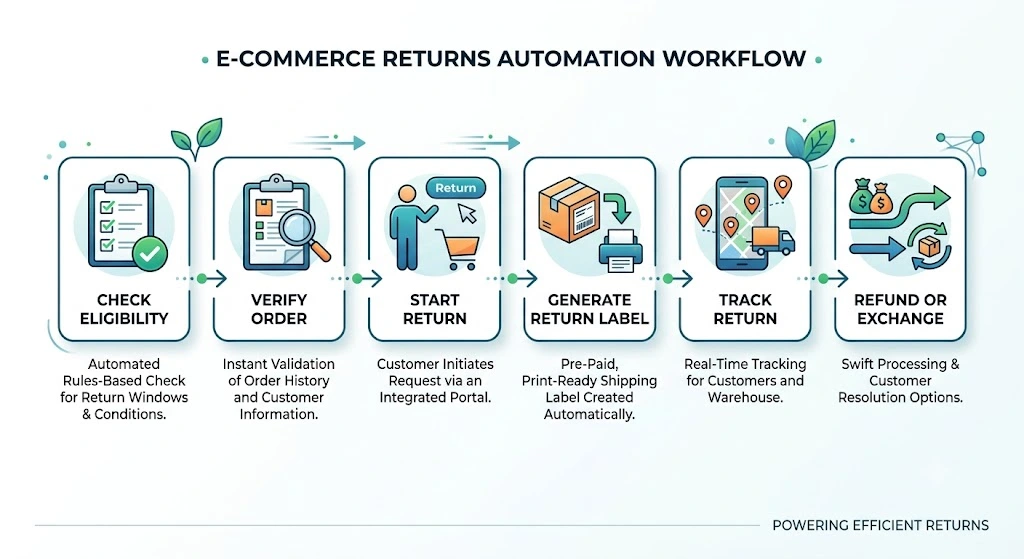
Returns are the highest-volume, most rules-based part of ecommerce support, which makes them the natural starting point for automation. Here’s how a well-built ecommerce AI chatbot moves a return from request to resolution.
Check Return Eligibility
The AI checks the order date against the return window, confirms the specific product is eligible under your policy, and flags whether a return has already been opened for that order.
Verify the Order and Product
Before anything moves forward, it matches the customer’s request to the exact order and item — not just the account, but the specific SKU, size, or variant being returned.
Start the Return Request
Once verified, it collects the return reason and any required details, then opens the return in your system.
Generate Return Instructions or Label
Depending on how your store handles logistics, it can issue a prepaid return label automatically or send clear pickup and drop-off instructions. Shopify’s own guidance on AI chatbot customer service points to returns and refunds as one of the highest-impact places to automate, precisely because the steps are so repeatable.
Track the Return
The chatbot keeps the customer updated as the item moves through the process — received, under inspection, and approved for refund or exchange — without them needing to open a support ticket to ask.
Handle Return Exceptions
Anything unusual — a damaged item, a request outside the window, or a pattern that looks like abuse — gets routed to a human instead of auto-approved.
How Ecommerce Refund Automation Works
Refunds are where trust is won or lost, and where ecommerce refund automation earns its keep fastest.
Verify Refund Eligibility
The AI confirms the return has been received and inspected, and checks it against your refund policy before anything moves forward.
Trigger the Refund
Once eligibility is confirmed, the chatbot can trigger the refund through the connected ecommerce or payment system, depending on the store’s setup.
Send Refund Status Updates
“Where is my refund?” is one of the most common post-purchase messages in ecommerce. The chatbot can answer it proactively, with the real status, the moment a customer asks.
Handle Partial or Failed Refunds
Not every refund is clean. Partial refunds, refunds split across payment methods, and failed transactions need special handling — the AI should flag these clearly rather than guessing, and confirm the exact amount and reason with the customer.
Escalate High-Risk Refunds
Refunds above a set dollar amount, disputed charges, and anything that doesn’t match the original order should always route to a human agent for a final check.
How AI Chatbots Handle Returns, Refunds and Exchanges
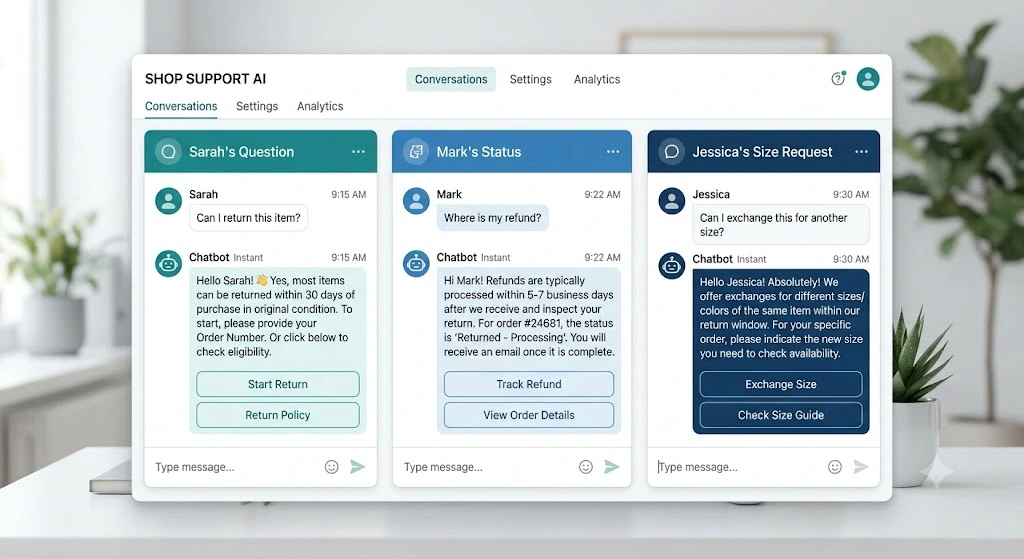
Customers rarely phrase things the way a policy page does. A useful ecommerce AI chatbot needs to recognize intent across everyday phrasing, not just formal requests:
- “Can I return this item?”
- “Where is my refund?”
- “Can I exchange this for another size?”
Handling these conversational questions — not just structured return forms — is what makes the difference between a chatbot people actually use and one they abandon after the first try.
AI Chatbot for Ecommerce Customer Support
Beyond returns and refunds, an AI chatbot for ecommerce customer support handles the broader volume of routine questions: order tracking and WISMO (“where is my order”) requests, shipping timelines, product questions, general FAQs, and order changes. Order tracking, returns, and product questions consistently make up the bulk of ecommerce support volume.
What Should an Ecommerce AI Chatbot Automate?
Not every task belongs to AI, and the line should be drawn deliberately.
Good Tasks to Automate
Return eligibility checks, refund status and processing, order tracking, shipping information, and basic FAQs — all low-risk, rules-based, high-volume. These are questions with a single correct answer that already lives in your store’s data, which is exactly why AI handles them well and why customers get faster resolutions without ever waiting in a queue.
Tasks That Need Human Review
Angry customers, disputed or high-value refunds, damaged or high-value items, suspected fraud, and any policy exception. These need judgment a model shouldn’t be making alone — the cost of getting one wrong is far higher than the time saved by automating it.
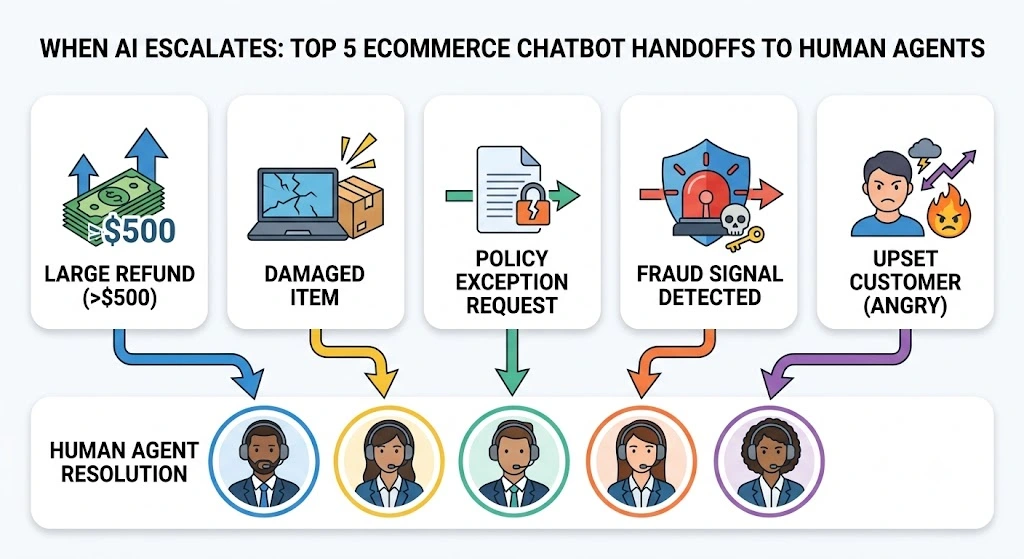
When Should an Ecommerce AI Chatbot Escalate to a Human?
This is the differentiator that separates a responsible deployment from a reckless one. A well-built ecommerce AI chatbot should escalate:
- Refunds above a set dollar limit
- Damaged or missing items
- Requests for policy exceptions
- Fraud or abuse signals
- Angry or clearly upset customers
The goal isn’t a system that auto-approves everything to look efficient — it’s a human-in-the-loop model where AI handles the routine and people handle the exceptions. Guidance from platforms like Zendesk consistently points the same way: automate the predictable, escalate the ambiguous.
How to Implement an Ecommerce AI Chatbot
Rolling one out for returns and refunds specifically comes down to a few focused steps: identify your most repetitive return and refund requests, connect your store’s live order data, add your exact return and refund rules, set automation limits like refund caps, build clear escalation rules, and test thoroughly before launch. If you’re running on Shopify, our guide to AI customer support tools for Shopify walks through returns- and refund-specific setup in more detail.
For a side-by-side comparison of platforms, pricing, and automation capabilities beyond Shopify, see our guide to the best AI tools for ecommerce customer support.
Benefits and Limitations
Benefits
Faster responses, true 24/7 availability, lower repetitive workload for your team, faster returns and refunds, and more consistent answers across every conversation. Customers get resolution the moment they ask, instead of waiting for the next available agent — which matters most during peak return periods, like the weeks right after a holiday sales spike.
Limitations
Incorrect answers when data isn’t integrated properly, wrong return or refund decisions if rules are vague, and privacy or security concerns around handling order and payment data. A chatbot that’s disconnected from live inventory or refund status will confidently give a customer the wrong answer, which does more damage than no chatbot at all. Every one of these risks is manageable — but only with the right rules and testing in place from day one.
How to Measure Ecommerce AI Chatbot Performance
Numbers tell you whether the chatbot is actually solving problems, not just whether it’s technically online. Track these six:
- Resolution rate — the share of return and refund conversations closed without a human
- Escalation rate — how often the AI correctly hands off to a person
- First response time — how fast a customer gets any answer at all
- CSAT — whether customers are satisfied with the resolution, not just the speed
- Refund and return processing time — how long it takes from request to completion
- Cost per resolution — what each conversation actually costs to resolve, automated or not
A high resolution rate paired with a low CSAT is a warning sign — it usually means the bot is closing conversations, not actually solving them.
Common Mistakes to Avoid
- Deploying without connecting real order and return data — a chatbot guessing at return windows is worse than no chatbot
- Leaving refund and return rules vague or undefined — ambiguity gets resolved by the AI, not by your policy
- Letting the AI auto-approve every case without limits — even a well-trained model needs guardrails on dollar amounts and edge cases
- Removing human escalation entirely — the fastest way to turn a frustrated customer into a lost one
- Skipping response testing before launch — test with real past return and refund conversations, not hypothetical ones
- Measuring success by conversation volume instead of outcomes — a busy chatbot isn’t the same as a useful one
FAQs About Ecommerce AI Chatbots
What is an ecommerce AI chatbot?
It’s a support tool connected to your store’s live order, product, and policy data that understands customer questions and either answers them or takes action — like starting a return — instead of relying on a fixed script.
Can an AI chatbot handle ecommerce returns?
Yes. It can check eligibility, start the return, generate a shipping label, and track the return through to completion, while flagging exceptions like damaged items for a human to review.
Can AI automate ecommerce refunds?
Yes, for standard cases. The chatbot can verify eligibility, trigger the refund, and send real-time status updates. Partial refunds, failed transactions, and disputes should still go to a human agent.
Can an AI chatbot track orders?
Yes — order tracking and “where is my order” questions are among the most common and easiest tasks for an ecommerce AI chatbot to handle accurately.
Can AI chatbots replace ecommerce customer support agents?
No. They remove repetitive workload, not judgment-based decisions. Complex complaints, fraud concerns, and emotionally sensitive conversations should always reach a human.
When should an ecommerce chatbot transfer a customer to a human?
Whenever a refund exceeds a set limit, an item is damaged or missing, a policy exception is requested, fraud is suspected, or the customer is clearly frustrated — the conversation should move to a real person immediately.
Conclusion
Returns and refunds are where ecommerce AI chatbots pay off fastest — but only when they’re built on real store data, clear rules, and a genuine human safety net for the cases that need one. Automate the repetitive checks and status updates. Leave the judgment calls to people.
Ready to see what returns and refund automation could look like for your store? Start by mapping your top ten repetitive return and refund questions this week — that list alone will show you exactly where to begin.